
 Ranked #2 out of 61 VPNs
NordVPN is a jack-of-all-trades VPN. It costs a little less than ExpressVPN, has leading privacy and security features, and is packed with tools that are useful for both beginners and power users. While its usability has room for improvement, if you’re on the fence about which VPN to get, NordVPN is a great choice.
- Pros
- Excellent privacy & security features
- Works with US Netflix, Disney+ & more
- IP addresses from 127 countries
- Fast download speeds with NordLynx
- Apps for every popular platform & device
- 7-day Android free trial
- Cons
- Retains connection timestamps
- Dedicated IP feature is a privacy risk
- Expensive on renewal
- Less user-friendly apps than competitors
- Paywalls many advanced features
Since it’s almost impossible to avoid a NordVPN ad nowadays, it understandably comes with a lot of hype and expectation.
We’ve fact-checked its claims, dissected its buzzwords, and stress-tested its apps to provide you with the unfiltered truth: it’s a very good VPN, but it’s not as good as you’re led to believe.
It’s undeniably a high-end VPN service, and performs exactly how you’d expect: it’s very fast, encrypts your traffic securely, and unblocks most streaming services easily. We think it’s especially well-suited if you enjoy tinkering with your setup, thanks to its feature-rich apps.
But this level of customization is a double-edged sword: NordVPN’s apps are difficult to use and navigate, even for experienced users. Even usually straightforward actions, like disconnecting, can be exasperating.
Despite what it advertises, it’s also not as private as some competitors, since the VPN retains certain logs for 15 minutes after a session.
That’s why, on balance, we prefer ExpressVPN. Its apps are much easier to use, it unblocks more streaming services, and, unlike NordVPN, it allows torrenting on all servers. ExpressVPN’s slightly higher price may be a dealbreaker for some, but NordVPN is actually more expensive when it’s time to renew.
Still, we strongly recommend NordVPN — it ranks as the second-best VPN overall in our testing methodology for good reason.
🔄 Recent Updates
We’ve updated our NordVPN review with new user experience insights, analysis of the latest transparency report, and revisions to all other sections.
Privacy
Ranked #14 out of 61 VPNs for Privacy
We’re confident that NordVPN keeps your online activity private. As proven in a 2024 legal case, it operates a virtually no-logs privacy policy and uses RAM-only servers to prevent data extraction. The one caveat is that many of the VPN’s add-ons use separate privacy policies that collect far more data.
| Originating IP Address | No |
|---|---|
| Browsing Activity | No |
| Individual Connection Timestamps | No |
| Date of Last Connection | Yes |
| VPN Server IP | No |
| Device Information | No |
| Individual Bandwidth Usage | No |
| Account Information | Yes |
You can read NordVPN’s full privacy policy on its website.
Despite advertising itself as a “true no-logs VPN,” NordVPN retains a small amount of user data: your username and connection timestamps for 15 minutes after a session ends. While we prefer no logs at all, this is not enough to link your online activity back to you.
To ensure no user data is permanently logged, the VPN uses a RAM-only server network. All of its servers run on volatile memory that wipes your data after a server reboot. This prevents any third party from extracting your personal information, including the VPN service itself.
This was proven when NordVPN was ordered to surrender user data as part of a criminal investigation. It was only able to disclose payment-related data and confirmation that a particular email address was associated with a NordVPN account.
Though this isn’t enough to compromise your privacy, we strongly recommend signing up with an anonymous payment method and an email alias.
Private Jurisdiction, Despite Ownership’s EU Location
NordVPN is legally incorporated in Panama, a privacy-friendly jurisdiction with no affiliation to any international surveillance alliances. Panama has strong data privacy protection, allowing the VPN service to only retain minimal user data.
NordSecurity, the company behind NordVPN, is registered in the Netherlands. After contacting it, a representative confirmed this does not affect NordVPN’s Panama jurisdiction.
Streaming
Ranked #2 out of 61 VPNs for Streaming
Second only to ExpressVPN, NordVPN is an extremely consistent choice for streaming. It unblocked almost every streaming platform we tested, working particularly well with services based in the UK and Australia. It also reliably streams video content in HD to 4K quality, and it has apps for most devices.
| Streaming Service | Works with NordVPN |
|---|---|
| BBC iPlayer (UK) | Yes |
| DAZN (Canada) | Yes |
| Disney+ (UK) | Yes |
| Hulu (US) | Yes |
| ITVX (UK) | Yes |
| HBO Max (US) | Yes |
| Netflix (US) | Yes |
| Netflix (UK) | Yes |
| Prime Video (US) | Yes |
| Sky Go (UK) | Yes |
NordVPN itself — and other VPN review sites — credit the VPN’s streaming performance to its branded SmartPlay feature, which switches between DNS servers to help you access geo-blocked content.
But here at Top10VPN, we aren’t swayed by marketing buzz and tell it straight. While this feature is highly effective, it’s not unique to NordVPN at all: it’s actually used by many top streaming VPNs, like Windscribe and PrivateVPN.
NordVPN’s superior performance is most evident with Netflix, where it successfully unblocked 17 libraries. What impressed us most is that the VPN automatically connects you to a server that works with US Netflix, a feat no other VPN matches.
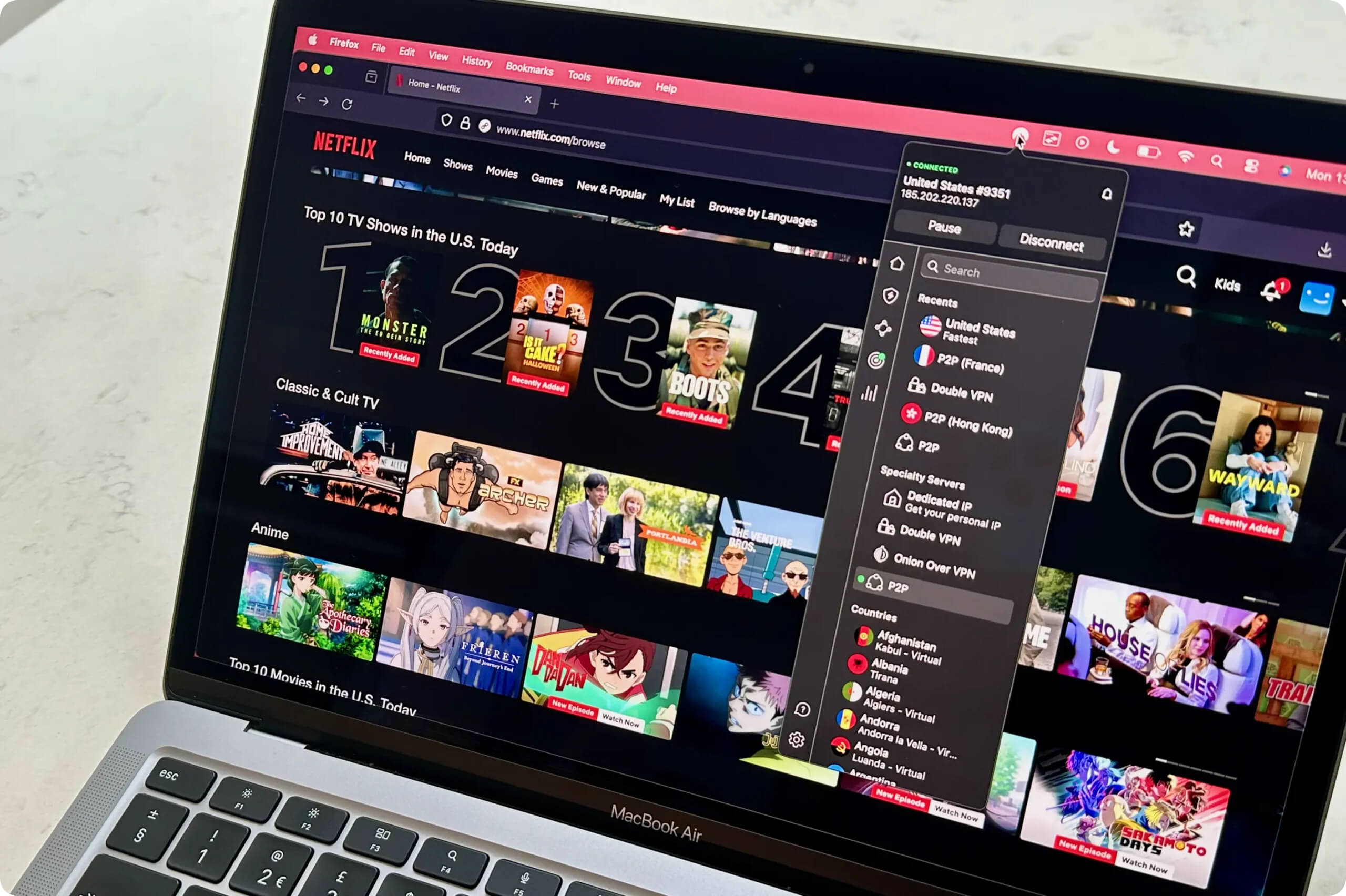
NordVPN works reliably with US Netflix.
However, the VPN is currently unable to access Netflix’s India and Netherlands libraries. This needs to improve, especially given that rival VPNs like Windscribe and ExpressVPN successfully unblock these regions.
This problem isn’t unique to Netflix, as we found that the VPN generally struggled to access Indian platforms. For example, we were left frustrated trying to stream JioHotstar with NordVPN, and ended up using ExpressVPN instead.
Thankfully, it excels in other international regions and remains our top choice for watching BBC iPlayer. Over years of testing, the VPN has consistently bypassed geo-blocks on the platform, allowing us to stream live and on-demand content in 1080p (Full HD).
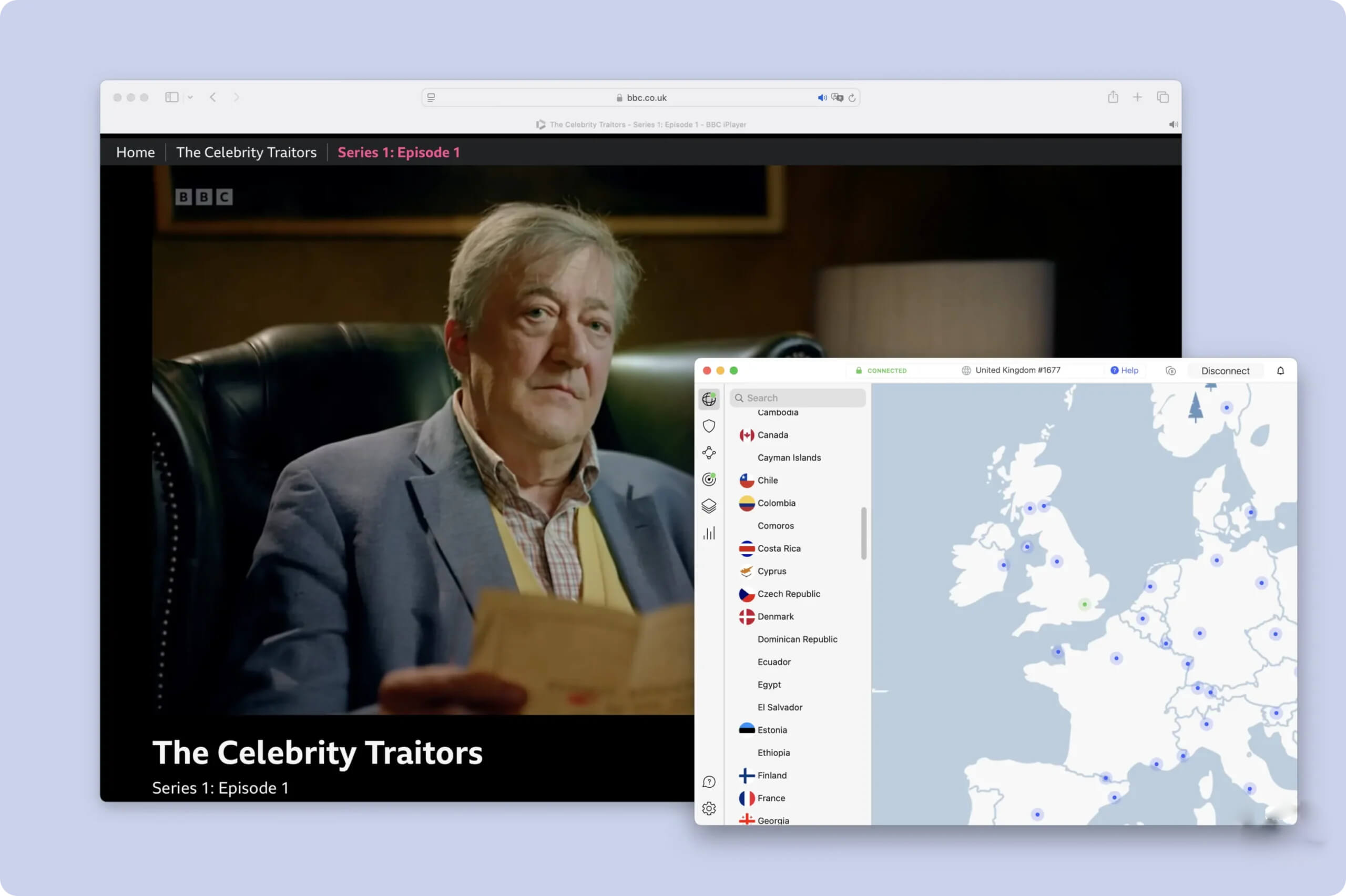
NordVPN is our recommended choice for BBC iPlayer.
It’s an excellent option for US streaming services, too. We used its New York server to watch YouTube TV, Peacock, and many others from overseas. Though it often worked first time, NordVPN also has servers in 21 US cities to switch between if you have any issues.
You can also use its generous spread of US servers to bypass local restrictions on NFL games. It works almost every time, as long as you select a location outside of the blackout zone.
Aside from its consistency, we also liked how compatible the VPN is with most streaming devices. That said, we’d like to see it take a page out of ExpressVPN’s book and introduce a router app for maximum coverage.
Speed
Ranked #5 out of 61 VPNs for Speed
The NordLynx protocol continues to perform well, with our tests recording an average speed loss of 4% on nearby servers. No matter the distance, your connection is fast and stable enough for online gaming, web browsing, and video calling.
| No VPN (New York) | US (New York) | Canada (Toronto) | US (Los Angeles) | UK (London) | Germany (Berlin) | Brazil (São Paulo) | Japan (Tokyo) | South Africa (Johannesburg) | Australia (Sydney) | |
|---|---|---|---|---|---|---|---|---|---|---|
| Server Location |  |
|
 |
|
 |
 |
 |
 |
 |
 |
| Download Speed | 100Mbps | 96Mbps | 97Mbps | 91Mbps | 90Mbps | 92Mbps | 83Mbps | 89Mbps | 66Mbps | 84Mbps |
| Upload Speed | 100Mbps | 94Mbps | 76Mbps | 14Mbps | 12Mbps | 12Mbps | 31Mbps | 7Mbps | 25Mbps | 5Mbps |
| Ping | 1ms | 8ms | 14ms | 74ms | 74ms | 98ms | 119ms | 144ms | 404ms | 201ms |
| Distance | 0mi | 5mi | 300mi | 2,500mi | 3,500mi | 4,000mi | 4,800mi | 6,700mi | 8,000mi | 9,900mi |
Even in locations as far away as Australia, NordVPN maintained incredibly fast speeds — well above what we typically see from other VPNs.
In fact, out of our top 10 highest-rated VPNs, NordVPN delivered the fastest download speeds when connecting to Japan and Canada.
It can sustain this excellent speed performance because it has more servers than any other VPN. It also automatically connects you to a less congested server, preventing overloaded servers and throttled performance.
For download speeds even faster than NordVPN’s in every location, we suggest using Hotspot Shield. Buyer beware, though, as its close-to-zero speed loss comes with the drawback of an intrusive logging policy and a closed-source VPN protocol.
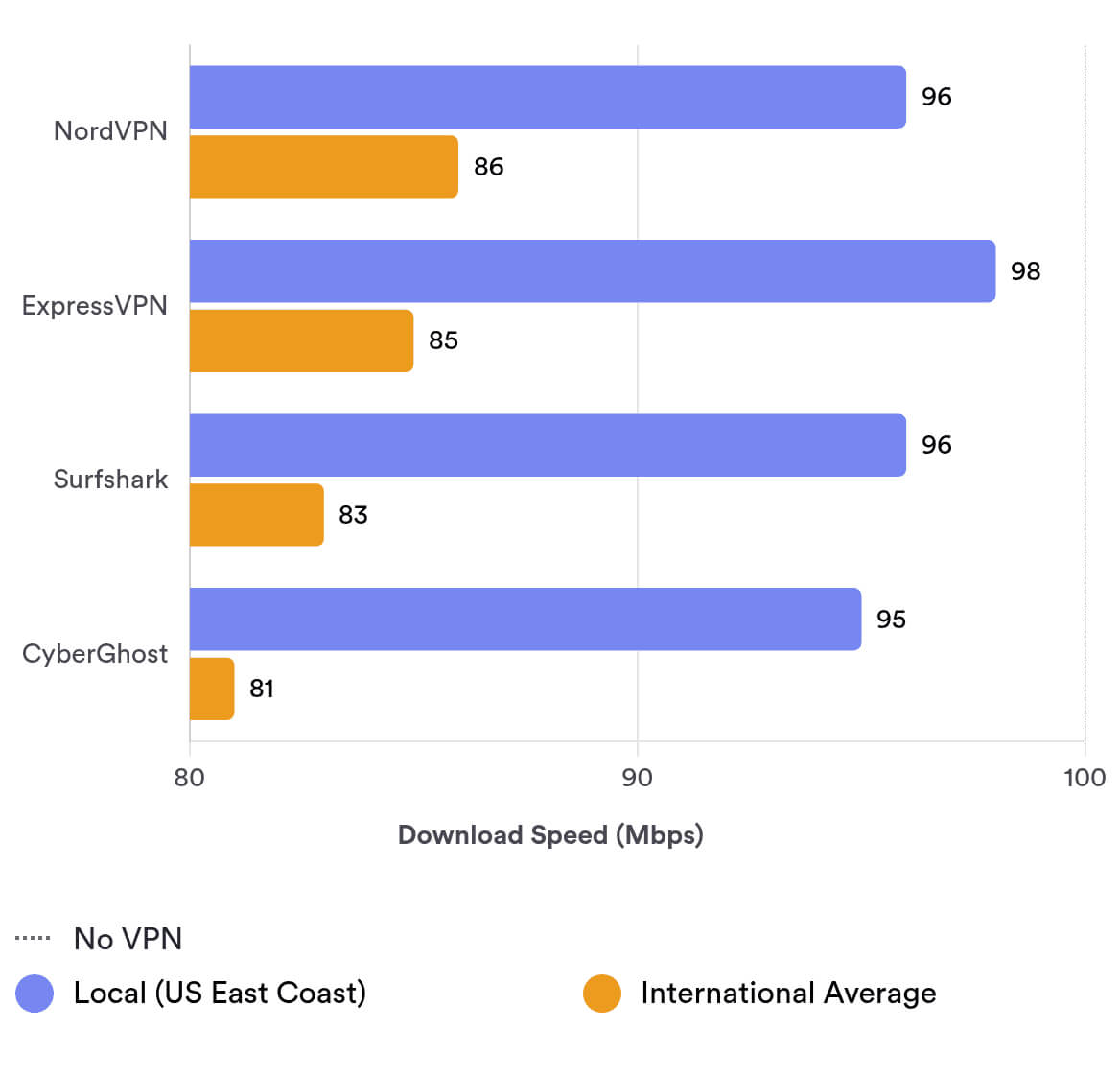
In the chart below, you can view how NordVPN’s local and average international download speed compares to other top VPNs:
Security
Ranked #7 out of 61 VPNs for Security
Our tests showed that NordVPN is a highly secure VPN service. It protects web traffic using WireGuard and ChaCha20 encryption, and it prevents unauthorized access to its network using diskless servers. Overall, NordVPN can be trusted to secure your online activity from third-party interference.
| Independent Audit | Yes |
|---|---|
| VPN Kill Switch | Yes |
| Leak Protection | Yes |
All of its apps use NordLynx by default, which is simply WireGuard with the addition of double NAT. Don’t be fooled by this marketing trick: its configuration is no different from any other VPN that uses WireGuard.
The reality is that NordVPN has chosen to brand its protocol to try and differentiate itself.
The VPN uses ChaCha20 to encrypt the traffic in its VPN tunnel and establishes the connection with a 2048-bit DH key.
To verify this worked, we analyzed the data packets passing through our network using Wireshark. As you can see in the screenshot below, NordVPN’s encryption meant that our internet traffic was shown as random text, preventing any third party from monitoring our activity.
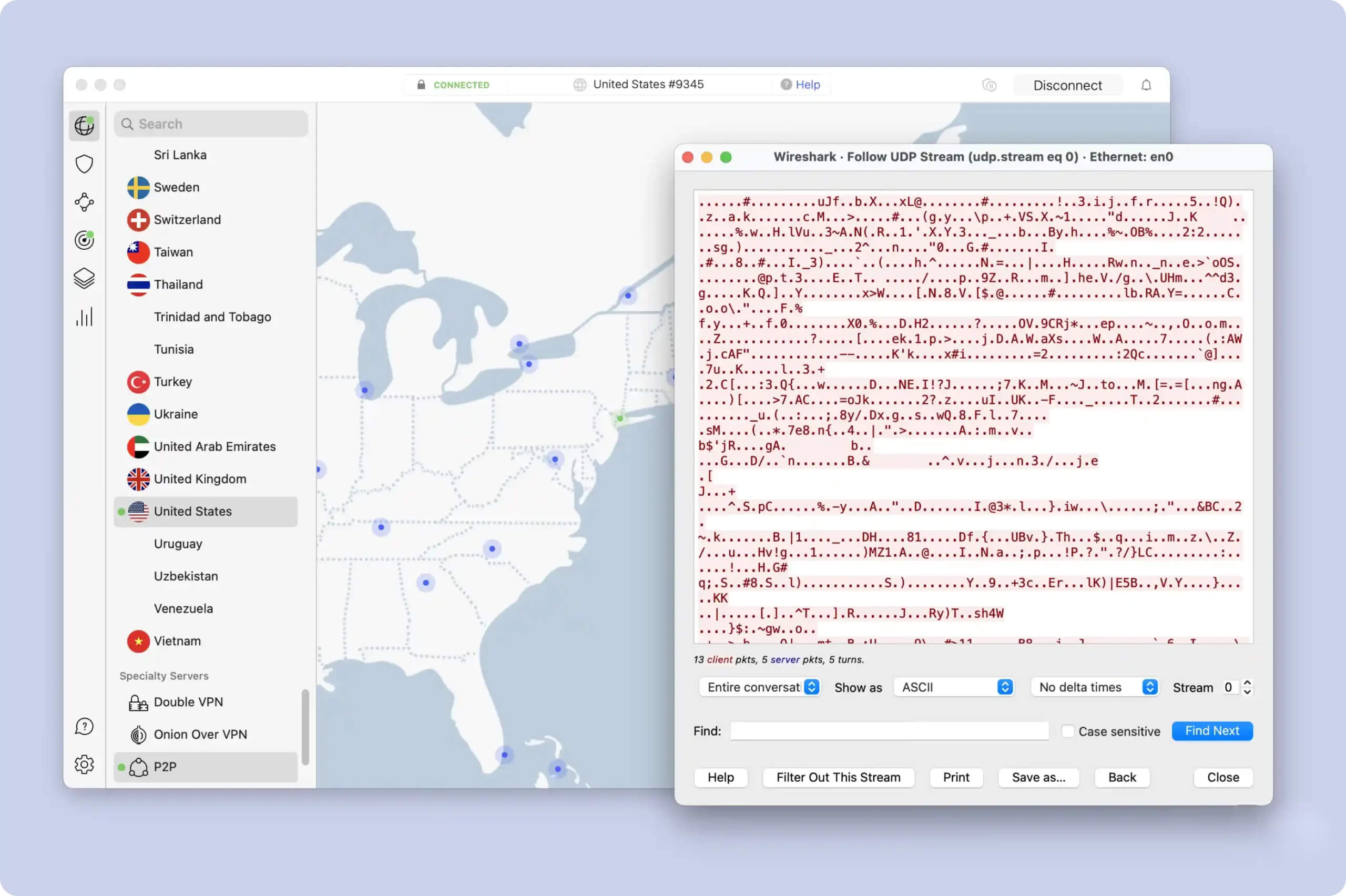
NordVPN secured our internet traffic.
Its kill switch also successfully prevented our real IP address from leaking when we simulated a sudden VPN connection drop.
The VPN is unusual in that it provides two types of kill switch: an internet kill switch and an app kill switch. The former works as usual, cutting your internet if the VPN disconnects, whereas the app kill switch lets you designate specific apps for protection.
We recommend using the system-wide internet kill switch for added security, especially if you’re torrenting files.
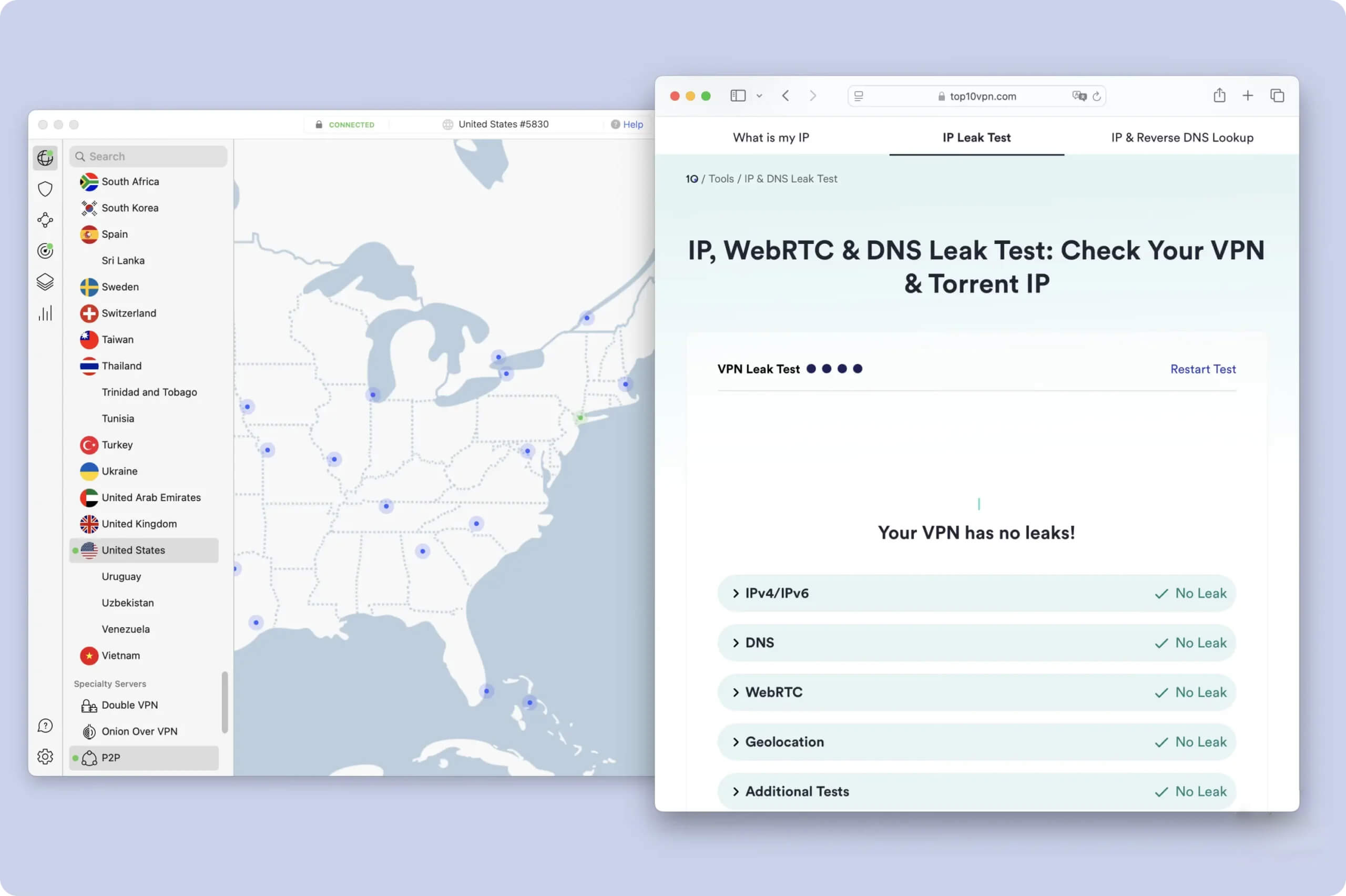
The VPN passed all of our data leak tests.
Multiple audits have proven the VPN’s security infrastructure, including a recent Cure53 audit which reviewed the source code of all NordVPN apps and extensions.
Server Locations
Ranked #1 out of 61 VPNs for Server Locations
Following multiple network expansions, NordVPN now offers IP addresses from 127 countries. This is more than any other VPN we review, although Proton VPN is close behind with 126. While this is phenomenal, we’d like to see more city-level options added in all locations.
| Continent | Countries with Servers |
|---|---|
| Europe | 44 |
| Asia | 32 |
| North America | 17 |
| Africa | 11 |
| South America | 10 |
| Oceania | 4 |
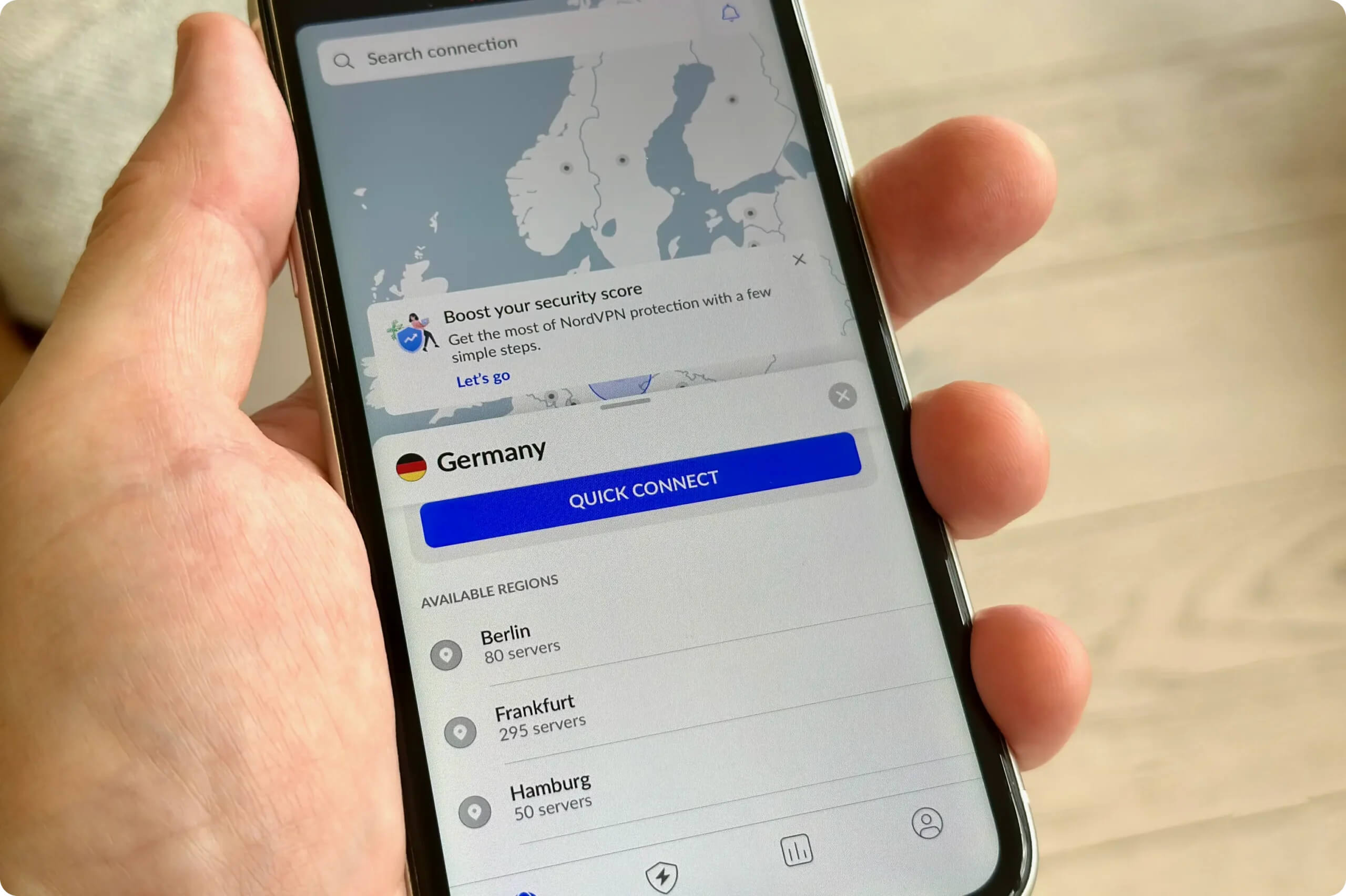
You can use NordVPN to connect to almost anywhere in the world.
With NordVPN, you can browse the internet as if you’re located in many popular countries, including the US, UK, Australia, and Canada.
But what really sets the VPN apart is its number of server locations in Africa and Asia, two continents regularly overlooked by most other VPN services (including ExpressVPN).
This represents an expansion of over 80% compared to 2023, when the VPN had servers in just 60 countries.
One area that needs improvement is its availability of city-level server options, especially in the US. Despite a recent increase, NordVPN provides servers in 29 fewer US cities than PIA, and 36 fewer than ExpressVPN.
User Experience
Ranked #3 out of 61 VPNs for User Experience
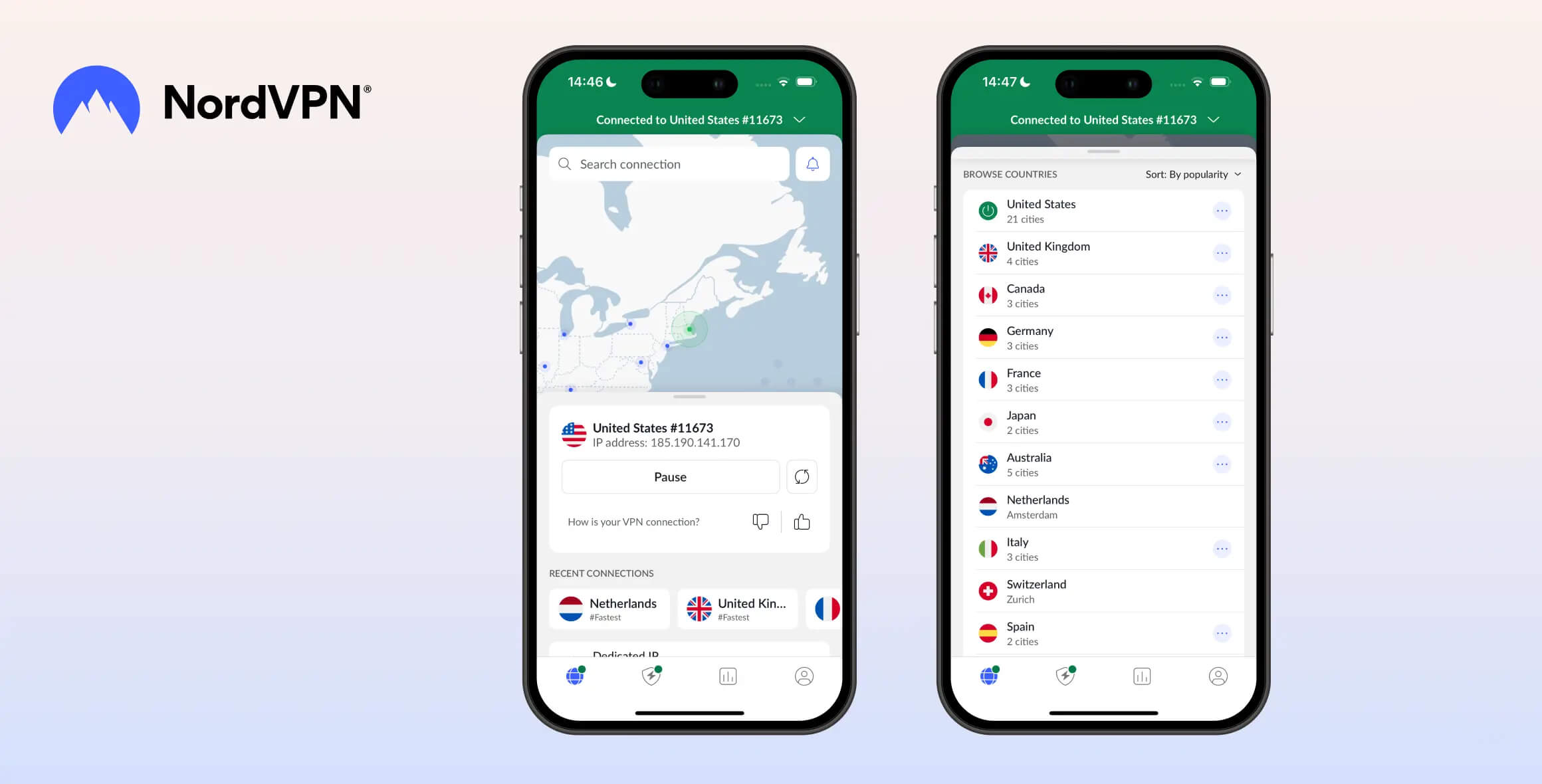
In our view, NordVPN strikes a good balance between user-friendliness and technical complexity. While its apps are well-made and slick, the interface can feel overwhelming because of the number of features. We’d also like to see a more consistent app design across devices.
Interface & Ease of Use
All of NordVPN’s apps use a simple but effective blue and white color palette. It makes the apps look crisp, stylish, and easy to read on all screen sizes.
However, there are some unintuitive design choices across all platforms.
You can find out how each app looks and feels below:
Desktop (Windows & Mac)
The first thing you’ll notice upon start-up is the sheer number of features on the app home screen.
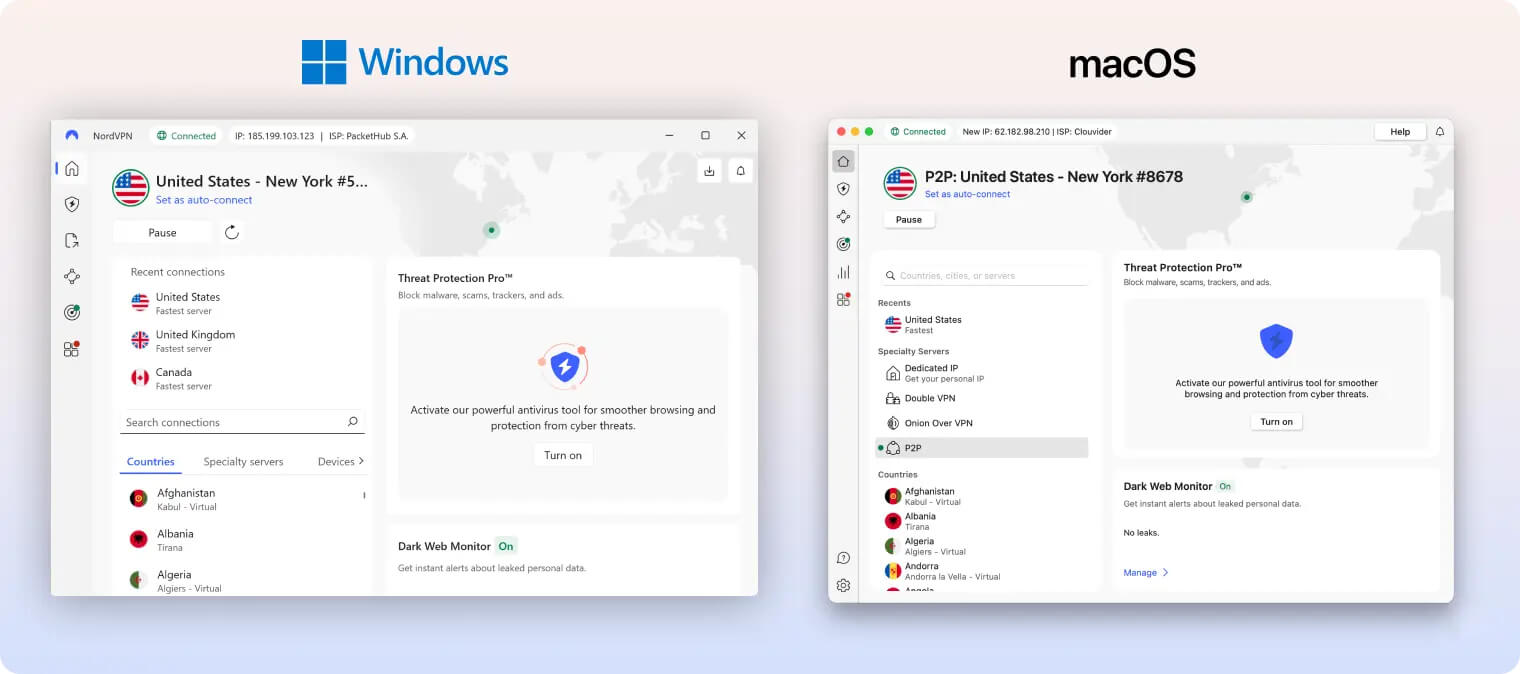
Half of the app’s interface is taken up by Threat Protection Pro and Dark Web Monitor. Considering neither is part of a VPN’s core function, this feels wildly disproportionate.
That said, we liked that the previously large map graphic has been given a reduced role. It is relegated to the app background, no longer interactive, and only serves to show your connected location.
We also really liked that the server list was always visible in alphabetical order. This made it quick and simple to select a server location.
Using the VPN itself was a mixed bag. We loved its quick connection times, but we hated its pause function. Instead of immediately disconnecting, like every other VPN, NordVPN only pauses your connection.
We can’t emphasize enough how annoying this is. You can manually disconnect by clicking the pause button and selecting the option from a drop-down menu, but this really should be one click.
Mobile (iPhone & Android)
We found NordVPN’s mobile apps easier to use than the desktop versions. Although the apps still give a lot of screen space to the interactive map, we much prefer this to seeing Threat Protection and Dark Web Monitor.
We also found scrolling to find a server much faster than on desktop.
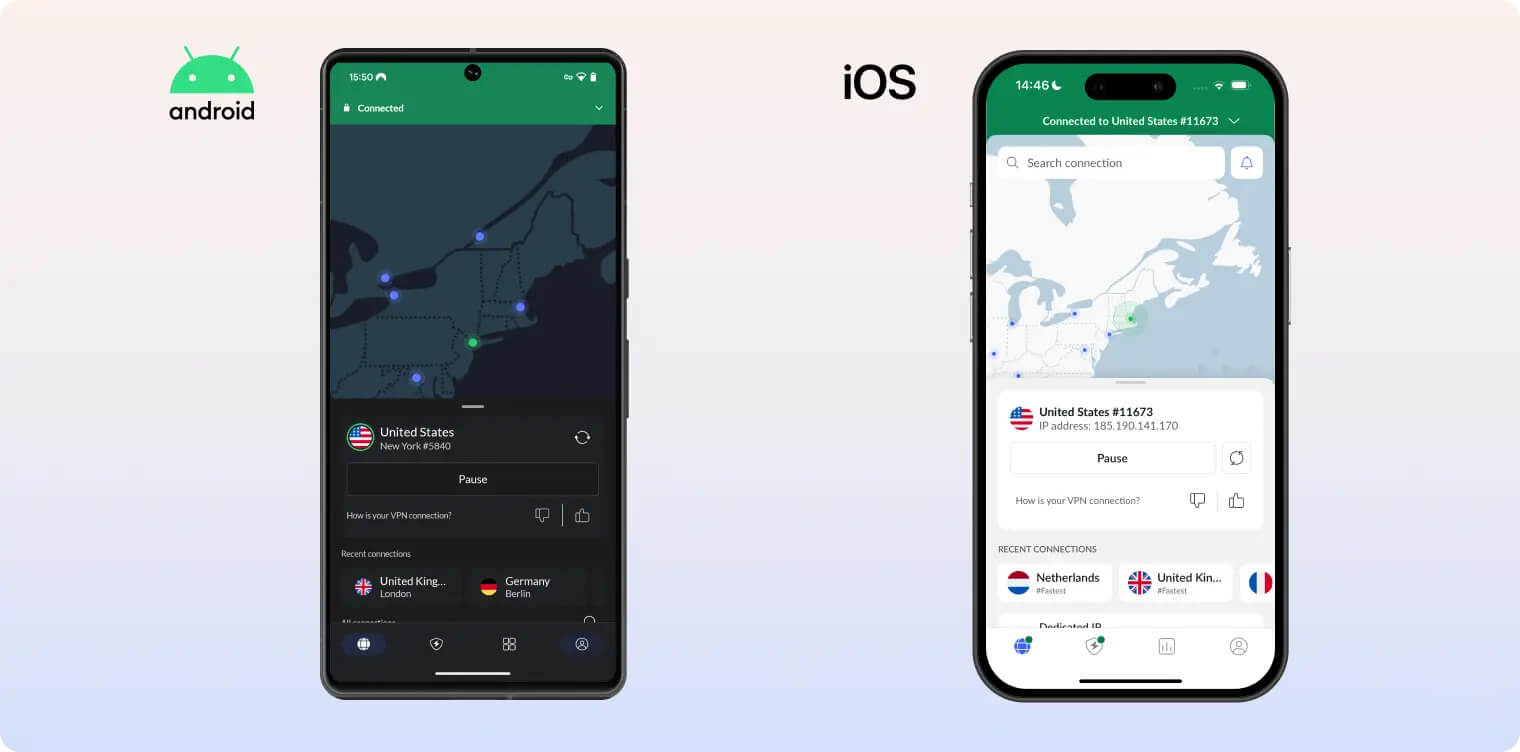
That said, there are some odd design choices on mobile, too. For instance, the statistics tab feels unnecessary, since there’s no real benefit to knowing how many days in a row you’ve connected to the VPN.
This strikes us as an attempt to mimic popular social media apps that reward “streaks” to encourage regular usage.
We also found the pause function even more frustrating on mobile, as we weren’t able to have a ‘set-and-forget’ experience, like with most mobile VPNs.
There is a ‘disconnect’ button, but it requires scrolling down the server list and tapping on your specific location. This wasn’t entirely obvious at first and takes far too much time.
Streaming Devices (Fire TV, Apple TV & Android TV)
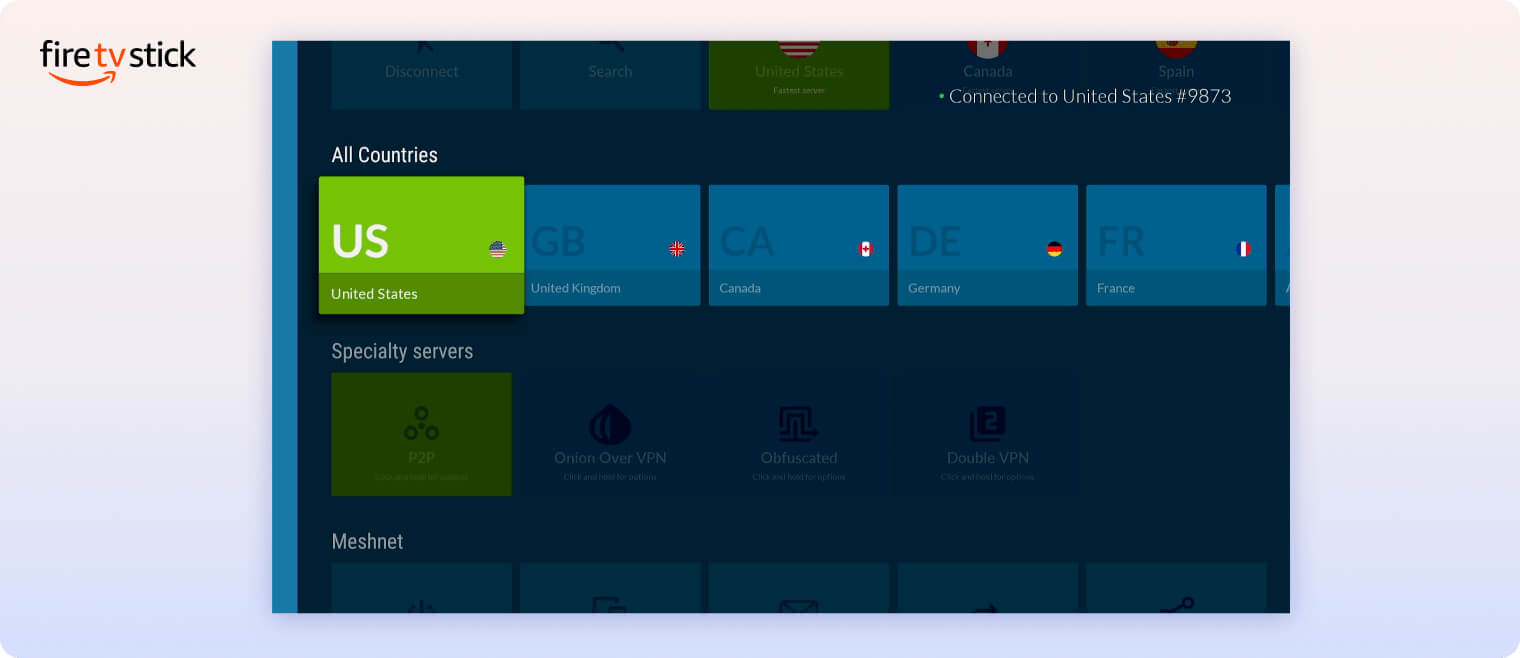
We tried out NordVPN on streaming devices like Amazon Fire TV and Android TV, and found it mostly easy to use, but with some changes needed.
The horizontal scrolling interface for selecting servers felt clunky and time-consuming when using a TV remote. We would have preferred an alphabetical or continent-based organization to make server selection faster.
Torrenting
Ranked #8 out of 61 VPNs for Torrenting
NordVPN permits torrenting activity on over 85% of its 8,100 servers. Even without port forwarding, it provides an impressive average download bitrate of 9.8MiB/s on our 10MiB/s connection. Although torrenting is restricted on servers in 14 countries, it’s unlikely to impact your experience.
| Torrenting Attribute | NordVPN |
|---|---|
| Permits P2P Traffic | Yes |
| Average Download Bitrate | 9.8MiB/s (2% loss) |
| Countries with P2P Servers | 113 |
| Port Forwarding | No |
| Kill Switch | Yes |
| Logging Policy | No Identifiable Data |
As shown in its transparency reports, NordVPN has never forwarded a DMCA request to a user. This suggests that users’ downloads are kept private and untraceable.
Though we can’t fault its commitment to user privacy, we don’t find it the easiest VPN to use for torrenting. While all of ExpressVPN’s servers include built-in P2P support, NordVPN requires you to select a dedicated server.
You can find these under the “Specialty servers” tab, labeled as “P2P”. This is a separate server list with 14 fewer countries than its standard server network, excluding Argentina, Israel, and South Korea, among others.
Any attempt to torrent in a non-P2P location causes the app to automatically reroute your traffic through servers in Canada or the Netherlands. Depending on your physical location, this can massively slow down your file-sharing speeds.
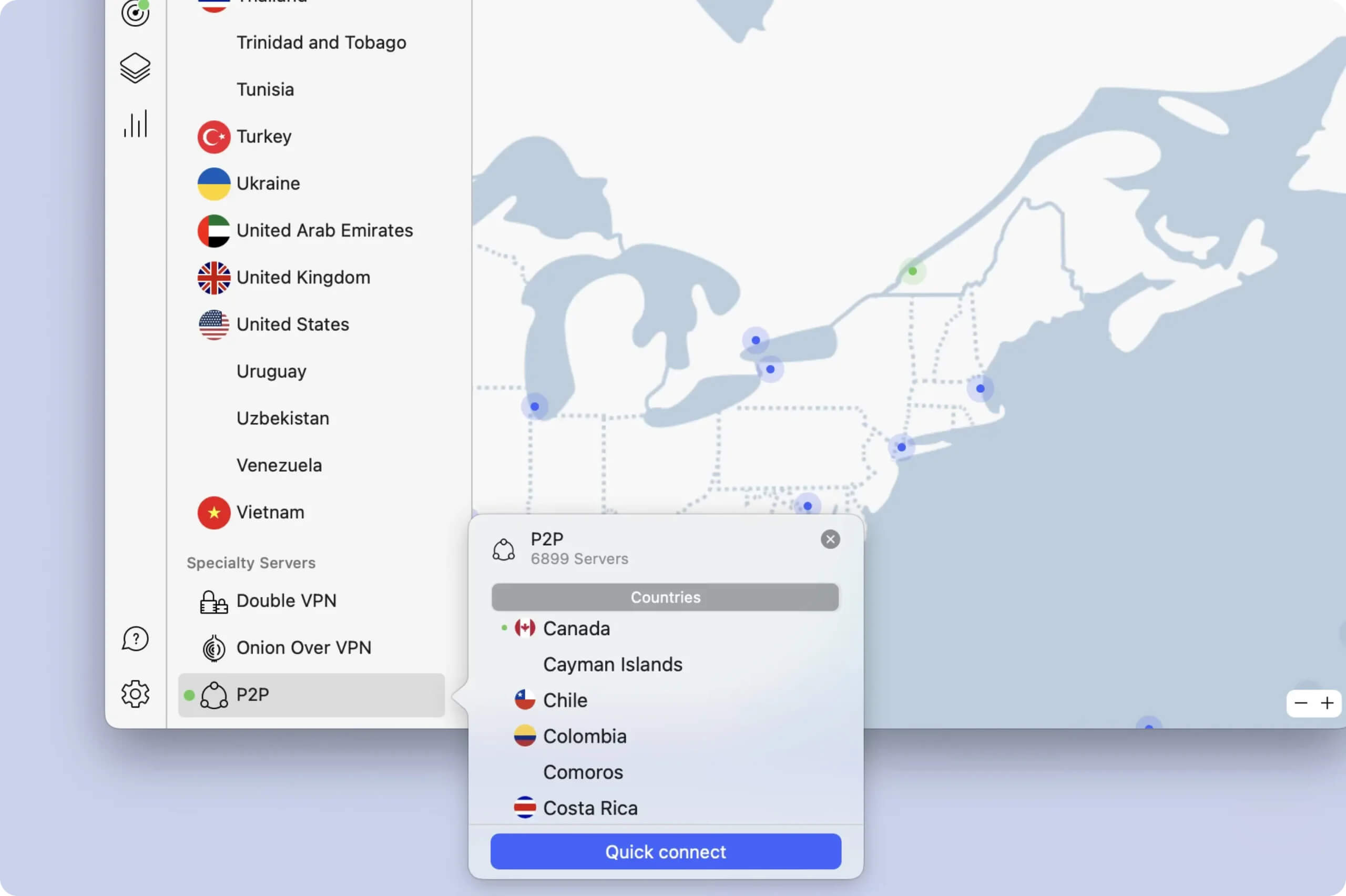
We suggest you use a P2P server for the fastest download bitrate.
In the table below, you can compare how fast NordVPN downloaded a 20GB torrent versus other VPNs:
| VPN Service | Download Bitrate | Time Taken (20GB File) |
|---|---|---|
| No VPN | 10MiB/s | 32 minutes |
| NordVPN | 9.8MiB/s | 32 minutes |
| IPVanish | 9.9MiB/s | 32 minutes |
| PureVPN | 8.1MiB/s | 39 minutes |
| CyberGhost | 3.9MiB/s | 1 hour 21 minutes |
As you can see, NordVPN downloads files faster than most competing services. We’d like to see port forwarding added for further improvement, but it isn’t essential.
If this is a sticking point for you, Proton VPN includes port forwarding and is an excellent VPN overall.
Device Compatibility
NordVPN has apps for all major platforms, including Fire TV and Apple TV. It can also be used on devices that don’t support VPN apps, like some Smart TVs, via its Smart DNS feature. Compatibility can be extended to Roku and Chromecast by installing it on a router. NordVPN allows simultaneous use on 10 devices, which is about the industry average.
| Windows | Yes |
|---|---|
| Mac | Yes |
| iOS | Yes |
| Android | Yes |
| Linux | Yes |
| Amazon Fire TV | Yes |
| Android TV | Yes |
| Apple TV | Yes |
| Router | Manual Setup Only |
| Chrome | Yes |
Simultaneous Connections: 10
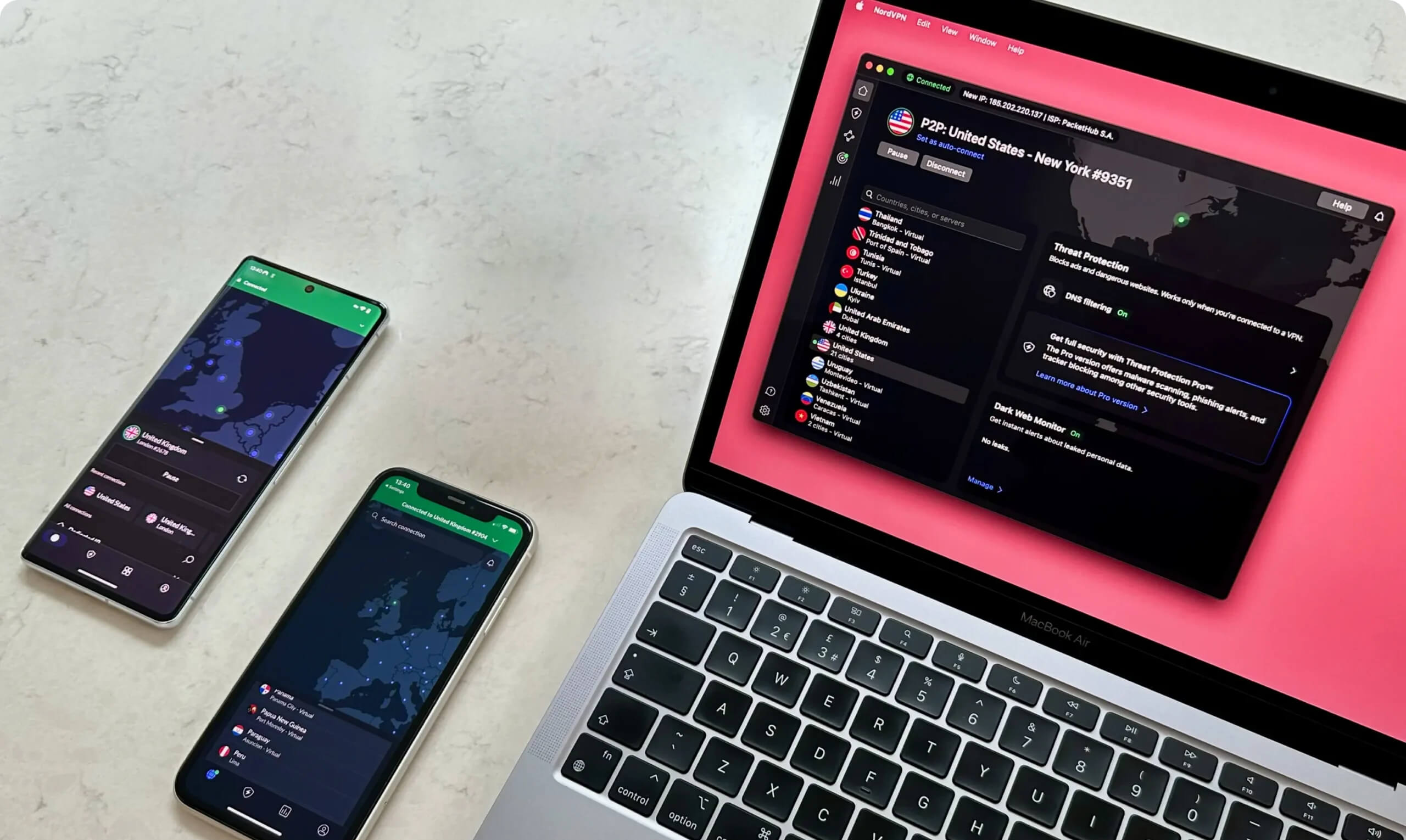
You can use NordVPN on multiple devices at once.
If you need to use the VPN on more than 10 devices, you can install it on your home router. This only counts as one device toward your limit, but it protects every device connected to your Wi-Fi network.
That said, NordVPN only supports manual router setup, which is hard to configure and manage. We’d like the VPN to develop its own dedicated router app, like ExpressVPN has, to make extending device compatibility much simpler.
Alternatively, you can use a VPN that offers unlimited simultaneous connections, such as Surfshark.
Additional Features
NordVPN’s apps offer more additional features than almost every alternative. Its unique Meshnet feature allows you to route traffic through any device, and we were impressed with its multi-hop feature. However, many of these tools are only available on the more expensive pricing plans.
| Additional Feature | NordVPN |
|---|---|
| Split Tunneling | Yes |
| VPN Obfuscation | Yes |
| Multi-Hop Servers | Yes |
| Dedicated IP | Yes (additional fee) |
| Ad Blocker | Yes (Plus & Ultimate plans) |
| Meshnet | Yes |
Multi-Hop Servers Provide Double Encryption
NordVPN is one of only a few VPNs to include a multi-hop feature. Unlike a standard VPN connection, this routes your internet traffic through two separate VPN servers and encrypts the traffic twice.
This improves your network security by making it more difficult for an attacker to track your traffic and identify your real IP address.
To enable it, find the ‘Specialty servers’ option in the app’s server list and select Double VPN.
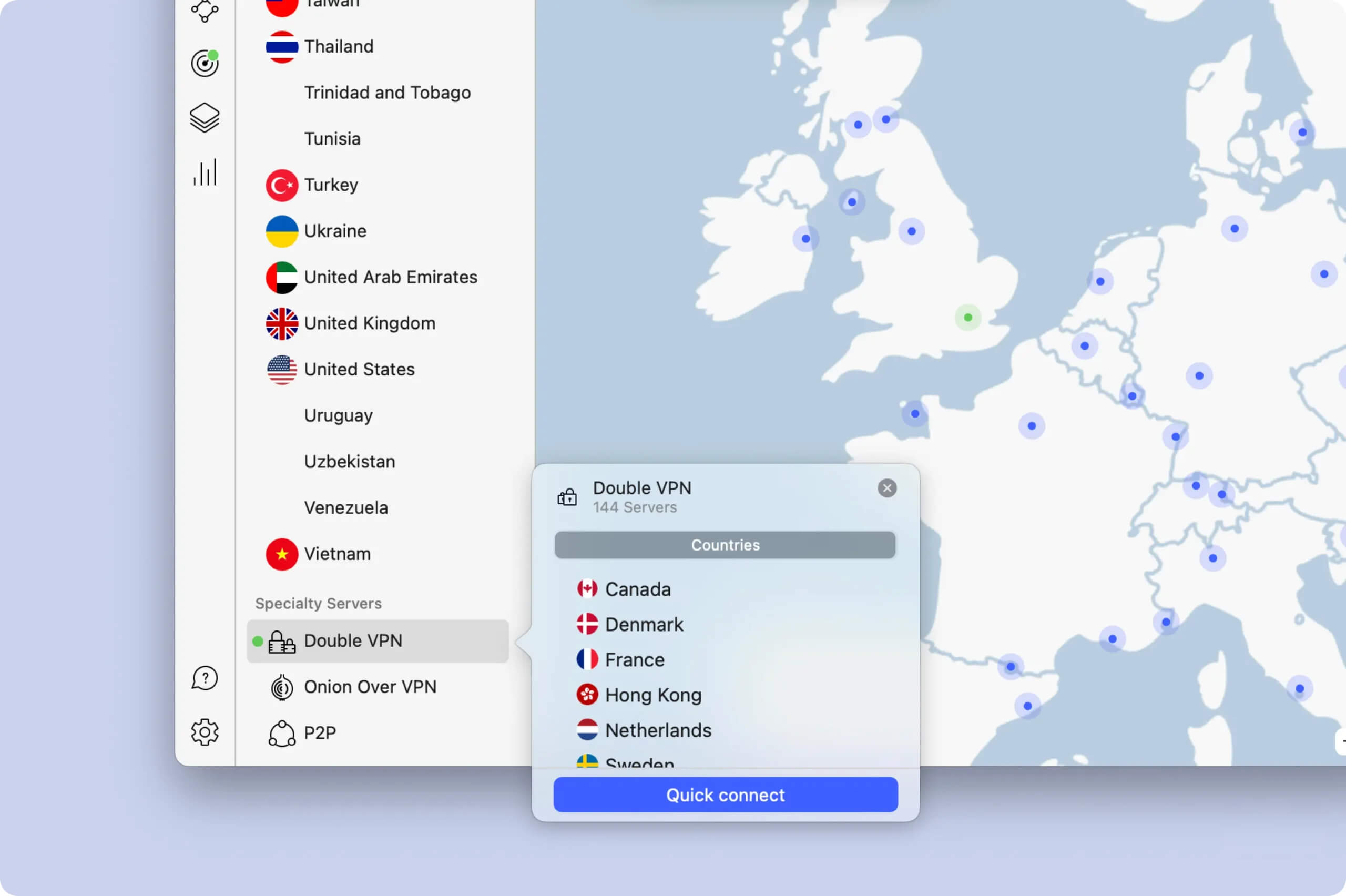
NordVPN’s multi-hop servers work perfectly.
That said, we would like to see multi-hop servers added in more locations. As it stands, they’re limited to just 10 countries, all in either Asia, North America, or Western Europe.
Threat Protection Blocks Malicious Websites & Ads
NordVPN’s Threat Protection feature is one of the best VPN ad and malware blockers we’ve used.
According to our research, the VPN’s ad blocker blocked 100% of ads and 79% of analytic trackers.
An ad blocker improves security because malicious ads are sometimes used to infect your device with malware. By preventing most ads from loading, Threat Protection reduces the risk of your device being compromised.
Meshnet Allows You to Get Another IP Address for Free
Meshnet is a unique feature of NordVPN. Available for free, it allows you to route internet traffic through a regular internet-connected device, like a laptop, rather than a VPN server.
The VPN service primarily promotes Meshnet as a tool for file-sharing and LAN gaming, but those are both fairly niche. Instead, we recommend using Meshnet as a way to get a residential IP address for free.
If you’re overseas, you can connect to your PC at home to get your regular ISP IP address. This is a completely free way to bypass geo-restrictions and even Netflix’s password-sharing ban.
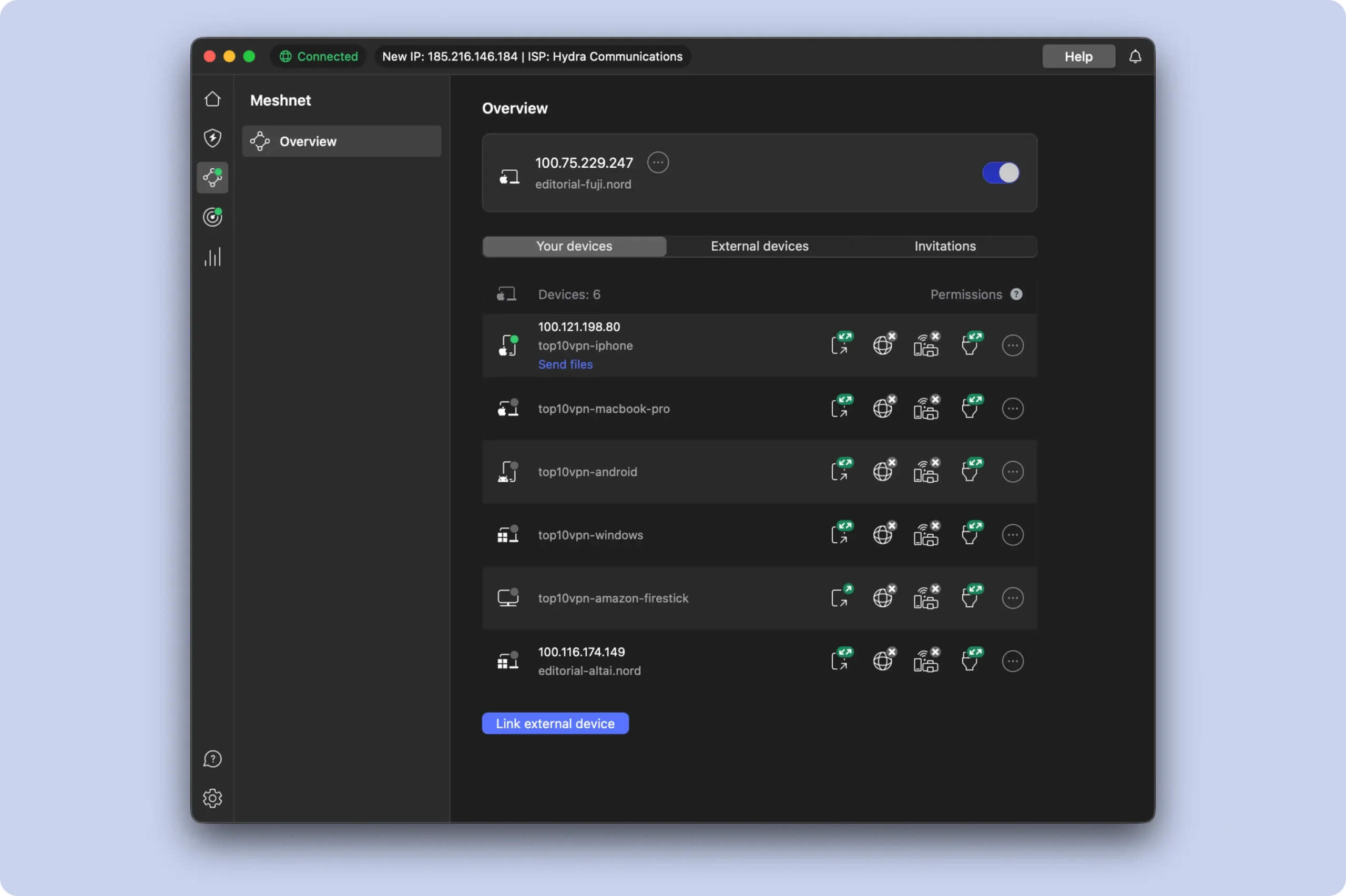
We got a residential IP address for free using Meshnet.
Dedicated IP Feature Compromises Anonymity
The VPN provides a dedicated IP feature for an additional $4.19 per month. However, we were concerned to learn that the dedicated IP address is directly connected to your NordVPN account.
This means law enforcement could have direct access to a user’s full details if they suspect the IP is tied to criminal activity.
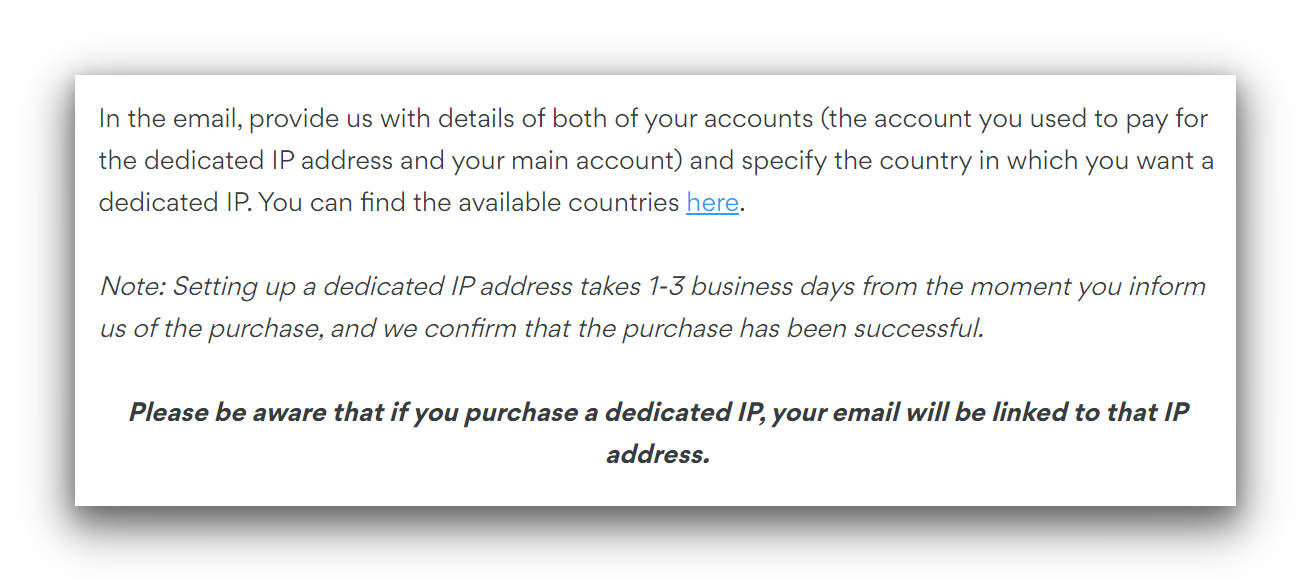
NordVPN’s dedicated IP address is linked to user accounts.
Other VPNs, like CyberGhost and ExpressVPN, have addressed this issue by using a token-based system that keeps your identity anonymous. We hope that NordVPN eventually does the same.
NordVPN Key Data
| Attribute | NordVPN | Typical VPN |
|---|---|---|
| Owner | Nord Security | Independent |
| Launch Date | 2012 | 2015 |
| Local Download Speed | 96Mbps (4% loss) | 89Mbps (11% loss) |
| International Download Speed | 86Mbps (14% loss) | 80Mbps (20% loss) |
| Countries with Servers | 127 | 40 |
| Privacy Policy | No Identifiable Data | Identifiable Data |
| Simultaneous Connections | 10 | 10 |
| Netflix Libraries | 17 | 3 |
| Torrenting | Yes | Yes |
| Works In China? | No | No |
| Cheapest Price | 2.99/mo over 27 months | $3.87/mo over 24 months |
| Customer Support | 24/7 Live Chat | |
| Apps & Extensions |
          |
|
Price
Price Plans
| 1 month | $12.99 |
|---|---|
| 12 months | $59.88 ($4.99/mo) |
| 27 months | $80.73 ($2.99/mo) |
Free Trial
| Money-Back Guarantee | 30 days |
|---|---|
| Free Trial | 7 days (Android only) |
| 100% Free Plan | No |